 Shanaei
 Platform and requirements
Meridian is IP address management for Red Hat Enterprise Linux 9 or a compatible system - Rocky Linux 9, AlmaLinux 9, Oracle Linux 9 or CentOS Stream 9 (x86_64). Not every RPM-based system is compatible: Fedora and openSUSE are not supported. It's one RPM that sets up everything it needs on that server - PostgreSQL, HTTPS, the firewall and its services - so a dedicated, freshly installed virtual machine is the preferred platform.
| Recommended | Notes | |
|---|---|---|
| Operating system | Rocky Linux 9.4 or later (minimal install) | RHEL 9.4+, AlmaLinux 9, Oracle Linux 9 and CentOS Stream 9 work the same. Python 3.12 and PostgreSQL come from the standard repositories. |
| CPU / memory | 2 vCPU, 4 GB RAM | Enough for tens of thousands of addresses; give it more for very large plans or many feeds. |
| Disk | 20 GB | The database stays small; leave room for backups. |
| Network | A static IP address | Users reach it on HTTPS (443). It reaches activation.shanaei.com:443 for activation and its daily licence check (directly or through a proxy), and your Asterisk DHCP / Atlas One servers for the feeds. |
| Access | root (or sudo) | for the installation only. |
Get the package
- Request the download at activation.shanaei.com/download/meridian with your name, email, company and phone. You get a personal status link straight away - keep it.
- Once we approve the request (usually the same working day), the status link shows the RPM and its SHA-256 checksum - and we email you the link. It works for 14 days.
- Copy both files to the server, e.g.
scp meridian-0.4.3-1.el9.x86_64.rpm* root@ipam01:/root/.
Install
On the server, as root - bring the system up to date, check the file, install:
dnf -y upgrade
cd /root
sha256sum -c meridian-0.4.3-1.el9.x86_64.rpm.sha256      # must say: OK
dnf -y install ./meridian-0.4.3-1.el9.x86_64.rpm
The installation runs Meridian's setup by itself. It:
- installs and initialises PostgreSQL, and creates the
meridiandatabase and user (local socket, no password to manage); - writes
/etc/meridian/meridian.confand a self-signed HTTPS certificate (replace it with your own later in Settings); - opens the firewall for HTTPS and the HTTP redirect, and starts
meridian-webandmeridian-worker.
At the end it prints the address to open, e.g. https://10.0.10.20/. Everything it did is in /var/log/meridian-setup.log.
systemctl status meridian-web meridian-worker --no-pager # both: active (running)First sign-in and activation
- Open the address in a browser. The certificate is self-signed at first, so the browser asks once - continue to the site.
- Create the administrator: user name and a password of at least 10 characters.
- Activate: Meridian shows its end-user licence agreement. Enter your full name and company and accept it - the one-month trial with every feature starts at once. In the last 7 days Meridian reminds you every day to request a licence and to download a backup.
- To buy, open Settings › Licence and request a subscription or perpetual licence - we confirm it by email and it arrives on its own at the next daily check.
/etc/meridian/meridian.conf, under [meridian],
then restart it:[meridian]
licence_proxy = http://proxy.example.com:3128systemctl restart meridian.targetConnect the feeds
Meridian fills the plan by itself from your DHCP server and your network monitoring. Under Feeds › Feeds, add:
| Feed | Address | Credential |
|---|---|---|
| Asterisk DHCP | https://<asterisk-server> | its API key - in Asterisk: Settings › Monitoring API |
| Atlas One | https://<atlas-one-server> | an API token ee_… - in Atlas One: Users & API tokens (read-only is enough) |
Each feed syncs into one VRF (shared, or a tenant's). The first sync starts within a minute: scopes become subnets, leases and reservations become addresses, ARP tables add MAC addresses. Addresses that fit no subnet make Meridian propose one for you to confirm or resize.
The pages
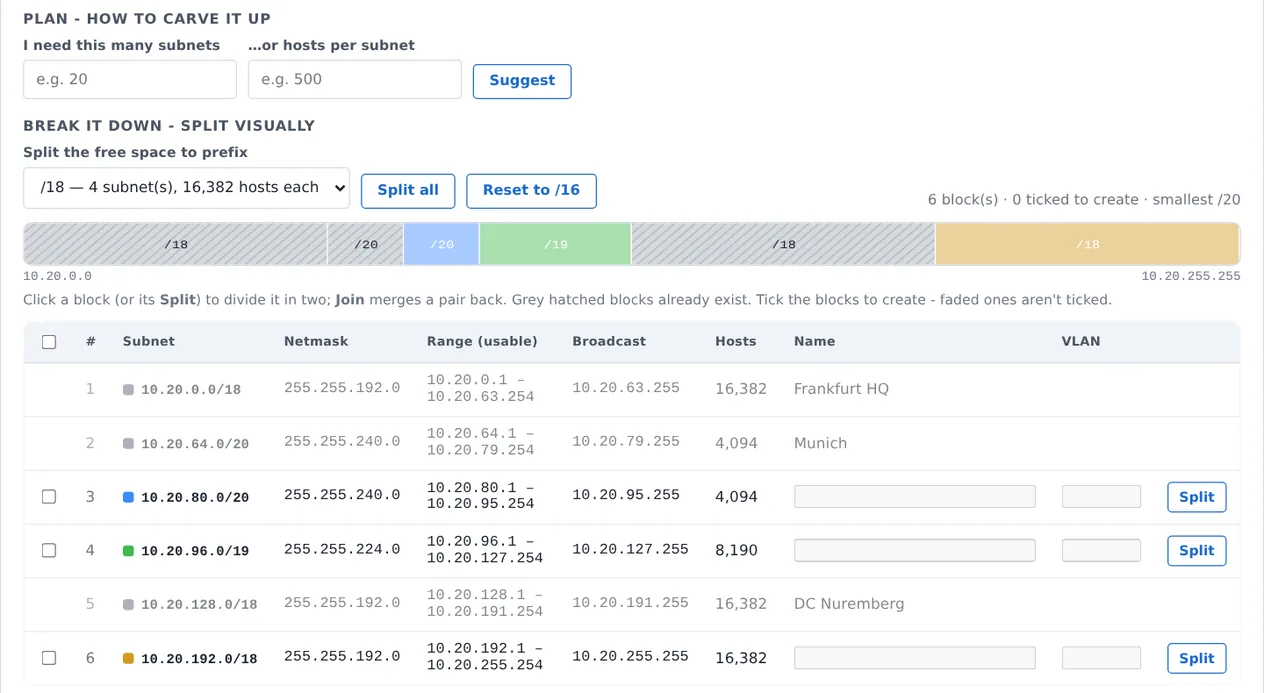
The menu on the left has five areas.
Passwords and accounts
Change your own password
Settings › Your account › Password: the current one, then the new one (at least 10 characters). Two-factor sign-in is set up on the same page - scan the code with an authenticator app and confirm with a code.
Reset someone else's password
An administrator opens Settings › Users & API tokens, edits the user and types a new password. Users from Active Directory / LDAP change their password in the directory, not in Meridian.
Lost the administrator password
On the server, as root - replace admin with the user name:
sudo -u meridian meridian passwd adminIt asks for the new password twice; sign in with it straight away. This also works when every administrator is locked out.
A token for Jupiter or a script
sudo -u meridian meridian token jupiter operator # role operator = read and reserve; viewer = read onlyIt prints the token (mr_…) once - store it in the other system. Tokens can also be made, and withdrawn, under Users & API tokens.
Backups and restore
Settings › Licence › Download a full backup saves the whole database (a PostgreSQL dump). It works even when the licence has run out. Keep a recent one somewhere else.
To restore it - on the same server or a new one with Meridian installed:
systemctl stop meridian.target
sudo -u meridian meridian restore /root/meridian-backup.dump      # asks you to type yes
systemctl start meridian.target
The restore runs in one transaction: if it fails, the database is left as it was.
Upgrades
Get the new RPM the same way (your download request can be renewed), then:
sha256sum -c meridian-0.4.4-1.el9.x86_64.rpm.sha256
dnf -y upgrade ./meridian-0.4.4-1.el9.x86_64.rpm
The database is updated and the services restart by themselves; your plan, settings and licence stay. Download a backup first.
Commands for operators
| What | Command |
|---|---|
| Services | systemctl status meridian-web meridian-worker |
| Restart | systemctl restart meridian.target |
| Logs | journalctl -u meridian-web -u meridian-worker --since "-1 h" |
| Settings file | /etc/meridian/meridian.conf (ports, proxy) - the rest is in the web interface |
| Re-run the setup | meridian-setup (safe to repeat) |
| Sync a feed now | sudo -u meridian meridian sync asterisk or … sync atlas |
| ICMP discovery | sudo -u meridian meridian discover 10.50.0.0/16 |
| Licence state | sudo -u meridian meridian licence · check in now: … licence checkin |
Troubleshooting
The page doesn't open
Check systemctl status meridian-web, then the firewall: firewall-cmd --list-ports should list 443/tcp (or 8443/tcp). The setup log is /var/log/meridian-setup.log; meridian-setup can be run again at any time.
Activation or the licence check fails
The server must reach https://activation.shanaei.com: try curl -sI https://activation.shanaei.com/. Behind a proxy, set licence_proxy (see activation). Meridian keeps working for up to 30 days without reaching it and warns you on the Licence page well before that.
A feed shows an error
Open the feed: the error says why - usually the address, the API key/token, or a certificate. Sync now tries again at once.
Still stuck?
Contact us with the output of journalctl -u meridian-web --since "-1 h" and the setup log.